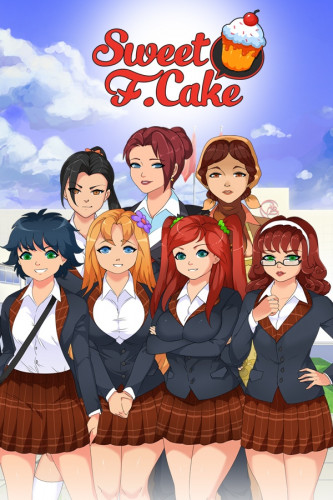
Sweet F. Cake (2020) PC | Portable
Release year: 2020
Genre: Erotic , Visual novel
Developer: Texic
Publisher: Bear in the Night Studio
Platform: PC
+18
Publication type: Portable
Version: 1.2
Interface language: English, Russian, Chinese
Voice language: None
Tablet: Not required
SYSTEM REQUIREMENTS: ✔
Operating system: Windows 7/8/8.1/10 ✔
Processor: Core 2 Duo 1.4 GHz ✔
Video card: 256 MB, HD Graphics 4000 ✔
RAM: 1 GB RAM ✔
Sound card: Compatible with OS ✔
Hard disk space: 3 GB
DESCRIPTION: An amazing story about a typical Soviet pioneer, whose life did not turn out in the most successful way for him: a friend did not stand the test of time, and the girl with whom the hero has been in love since childhood, He perceives him as a sister with a reproductive organ. Everything goes to hell until an old man appears and hands the young man an envelope containing an artifact that allows him to "replay" the current state of affairs and, perhaps, even surpass his past successes. The only thing the envelope's owner asks in return is virginity, which the protagonist is already trying so hard to lose. Agree or not? It's entirely up to you.
Installation: Copy the Sweet F. Cake folder to a convenient location. Run Sweet Fruitcake.exe. Play
Release: Usagi You can switch the game language from English to Russian and disable or enable censorship (advanced on must be set to activate 18+ content) in the game options. However, when you launch the game, the language will always reset to English - this setting is not saved in the options - this is a feature of the crack. It is not possible to remove the text window in the current version. It is recommended to run the game from a COPY of the folder - because The distribution includes a settings file necessary for the game to function, and it must not be changed for the torrent to work. For those experiencing a freeze during the first launch, uncheck "read-only" (for both the folder itself and all files in it) in the game folder's properties. Also, quitting the game by clicking the "X" icon on the window or pressing alt+f4 may prevent the game from loading. In this case, you can fix this by deleting the two files PassedStoryIDPack and PassedGalleryImagePack in the Sweet F. CakePersonalData folder. This will, however, reset any progress you've made to open the gallery. So, try exiting the game using the standard method.
Screenshots








New PC games
![SUFFOCATE [v 1.0.1] (2025) PC | RePack from FitGirl](https://ronros.com/inc/img/pages/games/games_pc/20260401232529_e05eb6a858bbcbe662432b014ebf9847.jpg)